드라이버 설치
운영 체제에 대한 호스트 드라이버를 설치한 다음, 호스트가 Modalix PCIe 카드를 검색할 수 있는지 확인합니다.
- Linux
- Windows
Linux 호스트에서 다음 명령을 실행하여 최신 드라이버를 설치합니다.
sima-user@sima-user-machine:~$ sima-cli install drivers/linux
... ... ...
=== Driver Installation Validation ===
  Component            | Status     | Details
  ----------------------------------------------------------------
  GStreamer            | PASS       | ✅ GStreamer plugin 'pciehost' installed
  Kernel Module        | PASS       | ✅ Kernel module 'sima_mla_drv' installed
  PCI Devices          | PASS       | ✅ Detected SiMa PCIe device(s):
  - 0000:04:00.0 Modalix HHHL v2              driver=sima_mla_drv

✅ Installation complete.
특정 드라이버 버전을 설치하려면 -v 플래그를 사용합니다.
sima-user@sima-user-machine:~$ sima-cli install drivers/linux -v 2.1.2
노트
드라이버 설치 후에는 유효성 검사를 수행하기 전에 호스트 장치를 재부팅합니다.
경고
레거시 MLSoC PCIe 카드에 대한 PCIe 드라이버 지원은 SDK 2.0.0에서 종료되었습니다. 위의 명령으로 설치되는 드라이버는 Modalix를 지원합니다. 레거시 MLSoC PCIe 카드를 사용하는 경우 sima-cli install drivers/linux -v 2.0.0을 사용하여 2.0.0 드라이버를 설치합니다.
Windows 호스트에서 다음 명령을 실행하여 드라이버를 설치합니다.
경고
이 기능은 현재 기술 미리보기 상태입니다. 이 드라이버를 설치하면 시스템이 드라이버 테스트 서명 모드로 들어갑니다. 시스템 변경 사항을 적용하기 전에 프롬프트를 확인합니다.
C:\Users\sima> sima-cli install drivers/windows
... ... ...
  ✅ Downloaded: pcie_develop_10082025_2.00.081025.1_B31.exe
  🚀 Running installation script in: C:\Users\sima
  📜 Script: pcie_develop_10082025_2.00.081025.1_B31.exe
  ╭─ Post-Installation Instructions ─╮
  │                                  │
  │  Driver successfully installed   │
  │                                  │
  ╰──────────────────────────────────╯
  ✅ Installation completed successfully.
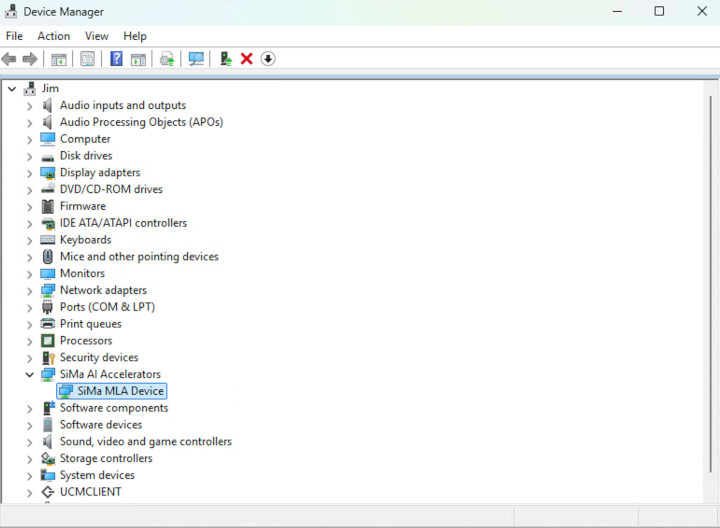
Windows 장치 관리자에서 SiMa AI 장치를 확인합니다.
노트
드라이버 설치 후에는 유효성 검사를 수행하기 전에 호스트 장치를 재부팅합니다.
확인 및 테스트
다음 명령을 실행하여 PCIe 열거를 확인합니다.
sima-cli device discover
설정이 올바르면 명령 출력에 연결된 SiMa PCIe 장치가 나열됩니다.