Ports and Network Behavior
Insight uses several ports during normal operation. The default ports are the ports used inside the SDK container or on a directly installed DevKit. In the Neat Development Environment, the SDK publishes those services onto host ports. If a default host port is already in use, sima-cli can allocate another available host port.
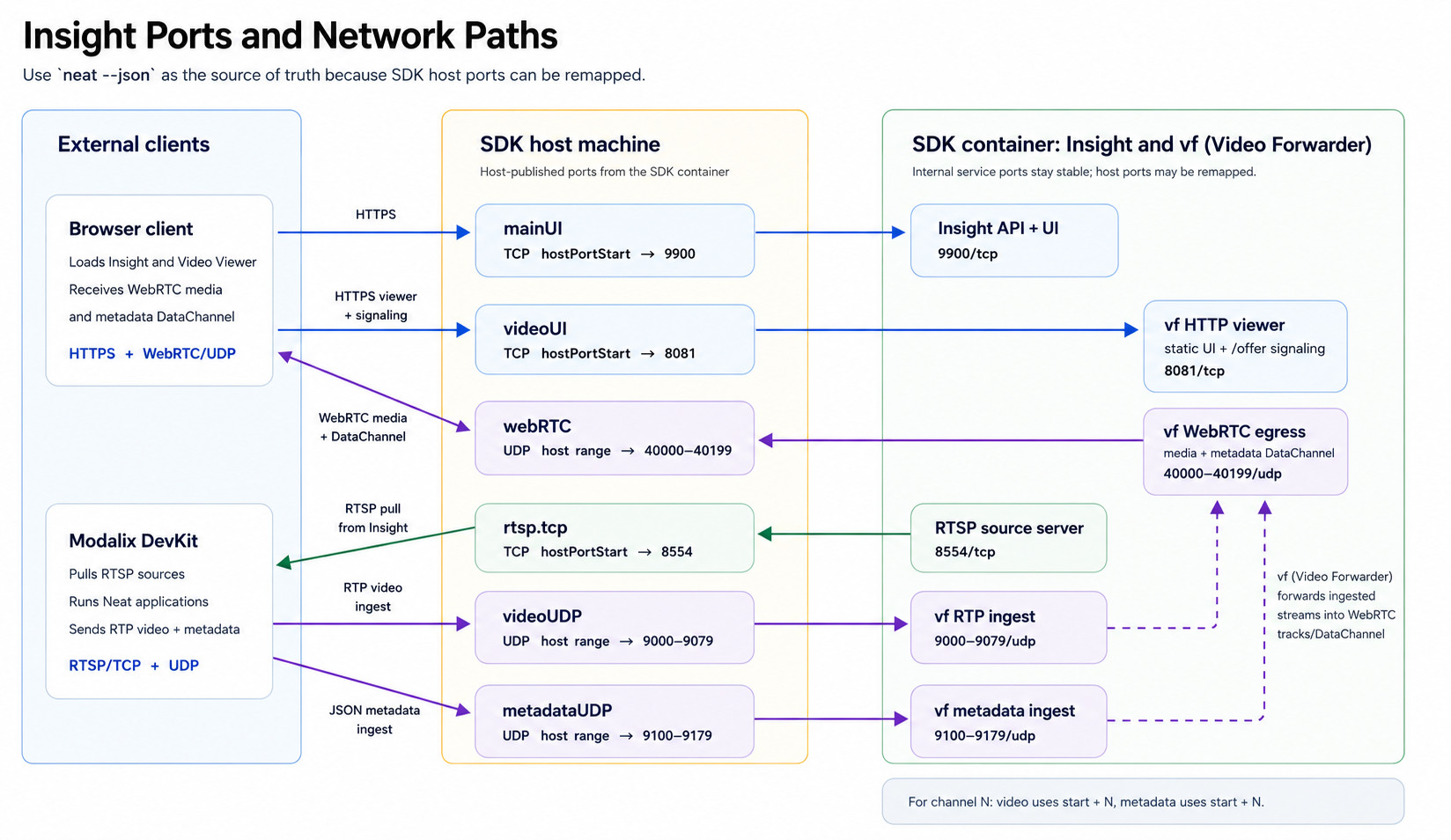
| Port-map name | Default port or range | Protocol | Purpose |
|---|---|---|---|
mainUI | 9900 | HTTPS/TCP | Main Insight web UI, HTTP API, and HTTP MJPEG streaming sources. |
videoUI | 8081 | HTTPS/TCP | WebRTC Video Viewer UI. |
rtsp.tcp | 8554 | RTSP/TCP | RTSP streaming sources created from uploaded media. |
videoUDP | 9000-9079 | UDP | Video RTP ingest for viewer channels 0-79. |
metadataUDP | 9100-9179 | UDP | Metadata JSON ingest for viewer channels 0-79. |
webRTC | 40000-40199 | UDP | WebRTC media and metadata DataChannel egress from vf to the browser. |
webSSH | 8022 | HTTPS/TCP | Browser shell to a paired DevKit when available. |
Find the actual SDK port map
In the SDK, do not assume default host ports are available. Run:
neat --json
The output includes insight.webUiUrl and an exposedPorts array:
{
  "exposedPorts": [
    {"hostPortEnd": null, "hostPortStart": 9900, "name": "mainUI", "protocol": "tcp"},
    {"hostPortEnd": 9179, "hostPortStart": 9100, "name": "metadataUDP", "protocol": "udp"},
    {"hostPortEnd": null, "hostPortStart": 8554, "name": "rtsp.tcp", "protocol": "tcp"},
    {"hostPortEnd": 9079, "hostPortStart": 9000, "name": "videoUDP", "protocol": "udp"},
    {"hostPortEnd": null, "hostPortStart": 8081, "name": "videoUI", "protocol": "tcp"},
    {"hostPortEnd": 40199, "hostPortStart": 40000, "name": "webRTC", "protocol": "udp"},
    {"hostPortEnd": null, "hostPortStart": 8022, "name": "webSSH", "protocol": "tcp"}
  ],
  "insight": {
    "serviceState": "Running",
    "venv": "/opt/neat-insight/venv",
    "webUiUrl": "https://10.0.0.210:9900"
  }
}
If a host port was remapped, the hostPortStart value is the port that external clients should use. hostPortEnd is present for port ranges such as video, metadata, and WebRTC.
Channel mapping
The Video Viewer uses paired video and metadata ports. For channel N:
video:    UDP 9000 + N
metadata: UDP 9100 + N
For example:
| Viewer channel | Video port | Metadata port |
|---|---|---|
0 | 9000 | 9100 |
1 | 9001 | 9101 |
2 | 9002 | 9102 |
Keep the channel number consistent between video and metadata. If your application sends video to channel 3, send corresponding metadata to the metadata port for channel 3.
SDK port mapping
In the Neat Development Environment, ports may be remapped by the SDK container. Insight reads the SDK port-map configuration when available so UI links point to the browser-reachable host port.
This matters most for the Video Viewer. The internal default viewer port is 8081, but the browser-facing port can be different when the SDK maps videoUI to another host port.
Use System Information in the Insight UI to check the actual exposed ports before assuming a URL is wrong.
Configure applications with the port map
Use the application location to decide whether to use default container ports or SDK host-exposed ports.
| Application location | RTSP input from Insight | Video/metadata output to Insight |
|---|---|---|
| Inside the SDK container | rtsp://127.0.0.1:8554/srcN | 127.0.0.1:9000 + channel and 127.0.0.1:9100 + channel |
| On a DevKit or another external machine | rtsp://<sdk-host-ip>:<rtsp.tcp hostPortStart>/srcN | <sdk-host-ip>:<videoUDP hostPortStart + channel> and <sdk-host-ip>:<metadataUDP hostPortStart + channel> |
HTTP MJPEG sources use the main Insight UI/API port. In the SDK, use the mainUI host port from neat --json for those URLs.
For example, if neat --json reports:
{"name": "rtsp.tcp", "hostPortStart": 18554, "protocol": "tcp"}
{"name": "videoUDP", "hostPortStart": 19000, "hostPortEnd": 19079, "protocol": "udp"}
{"name": "metadataUDP", "hostPortStart": 19100, "hostPortEnd": 19179, "protocol": "udp"}
Then an application on a DevKit should use:
RTSP source src1:   rtsp://<sdk-host-ip>:18554/src1
video channel 0:    <sdk-host-ip>:19000
metadata channel 0: <sdk-host-ip>:19100
video channel 3:    <sdk-host-ip>:19003
metadata channel 3: <sdk-host-ip>:19103
If the application and Insight run in the same SDK container, use the default local ports instead.
Related tools
- Neat Development Environment provides the containerized build and run environment where Insight is bundled.
- Neat Library provides the application APIs used to build and run vision workloads.
- sima-cli installs and upgrades Insight packages and other Neat artifacts.
- Model Compiler and LLiMa produce model artifacts that you can inspect through Workspace and validate through applications running beside Insight.