Graph surgery
Most models can be compiled directly when their operators and tensor shapes are supported by the Model Compiler. Before changing a model, check the Model compatibility list and try the standard compile flow first.
Graph surgery is an advanced step for models that need targeted graph changes before they compile cleanly or before they run efficiently on a SiMa device. You can make those changes in the original Python model code and export the model again, or you can edit the exported ONNX graph directly.
The SDK ships a prebuilt sima-model-surgery skill for Codex and Claude. Ask
the agent to inspect your model and it can check compatibility, propose and
apply the needed graph edits, validate the result, and prepare the model for
another compile attempt. The skill is especially useful for YOLO models, where
graph surgery can improve compiler compatibility and optimize model outputs for
the SiMa runtime.
For example, ask:
Use the sima-model-surgery skill to inspect my YOLO model, optimize unsupported
graph sections, and validate the modified model.
Understand graph surgery
Graph surgery changes the structure of a neural-network computation graph. Use it when a model needs targeted changes before quantization, compilation, or deployment.
Common reasons include:
- Customize a pre-trained model.
- Replace an operator that is not supported by the Model Compiler.
- Reshape or rewrite graph operations that block efficient compilation.
- Optimize a model graph so more of the model runs on the MLA.
- Adapt a model for a target device or deployment constraint.
Choose where to make the change
The Model Compiler is updated regularly with support for additional operators. Some models still need graph surgery before all layers can run on the MLA or before the model reaches the performance target.
When possible, make the change in the source model code, such as the PyTorch or TensorFlow module that produced the exported model. Source-level rewrites are usually easier to review, test, and maintain.
When source-level changes are not practical, edit the exported ONNX graph directly. The rest of this page focuses on ONNX graph structure because ONNX is the interchange format consumed by the Model Compiler.
For example, you might reshape non-4D tensors to 4D or replace unsupported operators with supported alternatives.
The Model Compiler includes the sima-utils package. Import the ONNX helper
module before you modify a graph:
from sima_utils.onnx import onnx_helpers as oh
For Model Compiler APIs, see the AFE API reference.
Analyze MLA coverage
The SiMa MLSoC uses these execution backends:
- MLA
- CVU (EV74)
- APU (A65)
During compilation, the Model Compiler assigns operators to the MLA when
possible. Operators that cannot run on the MLA map to the CVU or APU. This can
split the model into multiple MLA segments and produce multiple .elf files.
For best performance, modify the model so more of it runs on the MLA. If the
whole model maps to the MLA, compilation produces a single .elf file.
Start by locating the layers that do not map to the MLA. Then decide which operators to replace or reshape. This requires both Model Compiler output and knowledge of ML operators, DSP processing, and MLA support.
Modify the graph
Use this workflow when you perform graph surgery:
- Compile the model with the Model Compiler.
- Identify layers that do not map to the MLA. Save and inspect the SiMa IR graph in Netron, or enable verbose Model Compiler logging.
- Modify the identified layers. If the layers appear throughout the model, split the model first and modify one section at a time.
- Save the modified model. If you split the model, merge the modified subgraphs.
- Run inference with the original model and the modified model. Compare the outputs.
- Compile the modified model with the Model Compiler.
- Confirm that compilation produces a single
.elffile when full MLA coverage is the goal.
For data-reshaping changes such as Reshape, Slice, Concat, and
Transpose, the original and modified outputs should match numerically. If the
change modifies math ordering, exact matches are not expected. In those cases,
evaluate the numerical difference and model-level accuracy.
For MLA operator support, see Model compatibility.
Review ONNX graph structure
ONNX is an open specification based on Protocol Buffers. An ONNX model contains:
- an extensible computation graph model
- standard data types
- built-in operators
The graph model and data types make up the ONNX Intermediate Representation (IR). Built-in operators are defined by the OPSET specification.
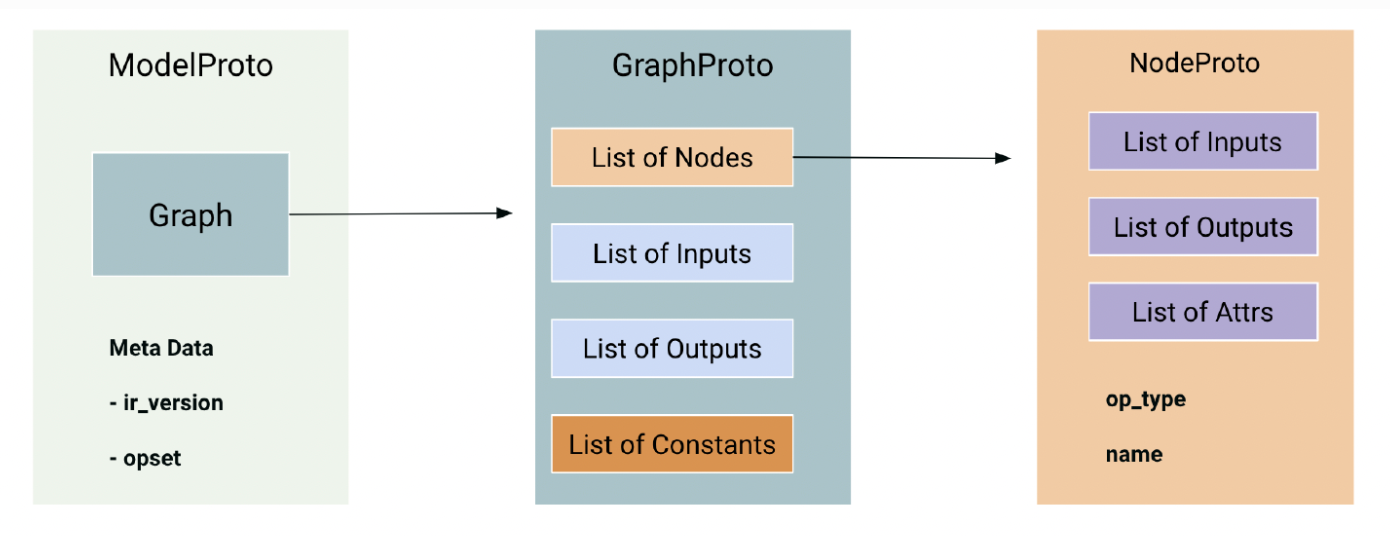
An ONNX graph defines the model computation. It contains nodes that form a directed acyclic graph through their inputs and outputs. This is equivalent to a network or graph in other deep learning frameworks.
ONNX graph entities are referenced by name:
- Value names include graph inputs, graph outputs, node inputs, node outputs, and constants.
- Node names use a separate namespace.
- A graph edge exists when one node output and another node input reference the same value name.
Access graph fields
After you load a model, access graph-level fields through:
model.graph.node: nodesmodel.graph.input: graph inputsmodel.graph.output: graph outputsmodel.graph.initializer: constants
You can remove, modify, or add graph-level components.
Access node-level fields through:
node.name: node namenode.op_type: operator typenode.input: node inputsnode.output: node outputsnode.attribute: node attributes
You can remove, modify, or add node-level components.
Validate the modified model
An ONNX file is a protobuf message. You can inspect it with any tool that reads
or writes protobuf messages. To validate an ONNX model, use
onnx.checker.check_model.
The model checker validates:
- IR version compatibility
- OPSET compatibility
- model consistency
Always call the model checker after graph surgery and before you save the modified model to disk.
Use this final validation workflow:
- Load the ONNX model.
- Perform graph surgery.
- Remove existing inference shape information.
- Validate the modified model with
onnx.checker.check_model. - Save the modified model.
- Verify the modified model's accuracy.